



Geocode & Map Addresses Geocode, reverse geocode and map addresses in Google Sheets. No API key needed.
Listed on the Google Workspace Marketplace as “Geocode & Map Addresses by Great Work”
$9.99 a month or $79 a year per Google account. Free trial: 250 lookups or 14 days, whichever comes first. No card needed.
Geocode a whole column of addresses in a few clicks, without a Google Maps API key, a billing account or a separate website login.
What you get
- 5,000 lookups every month (geocode or reverse geocode)
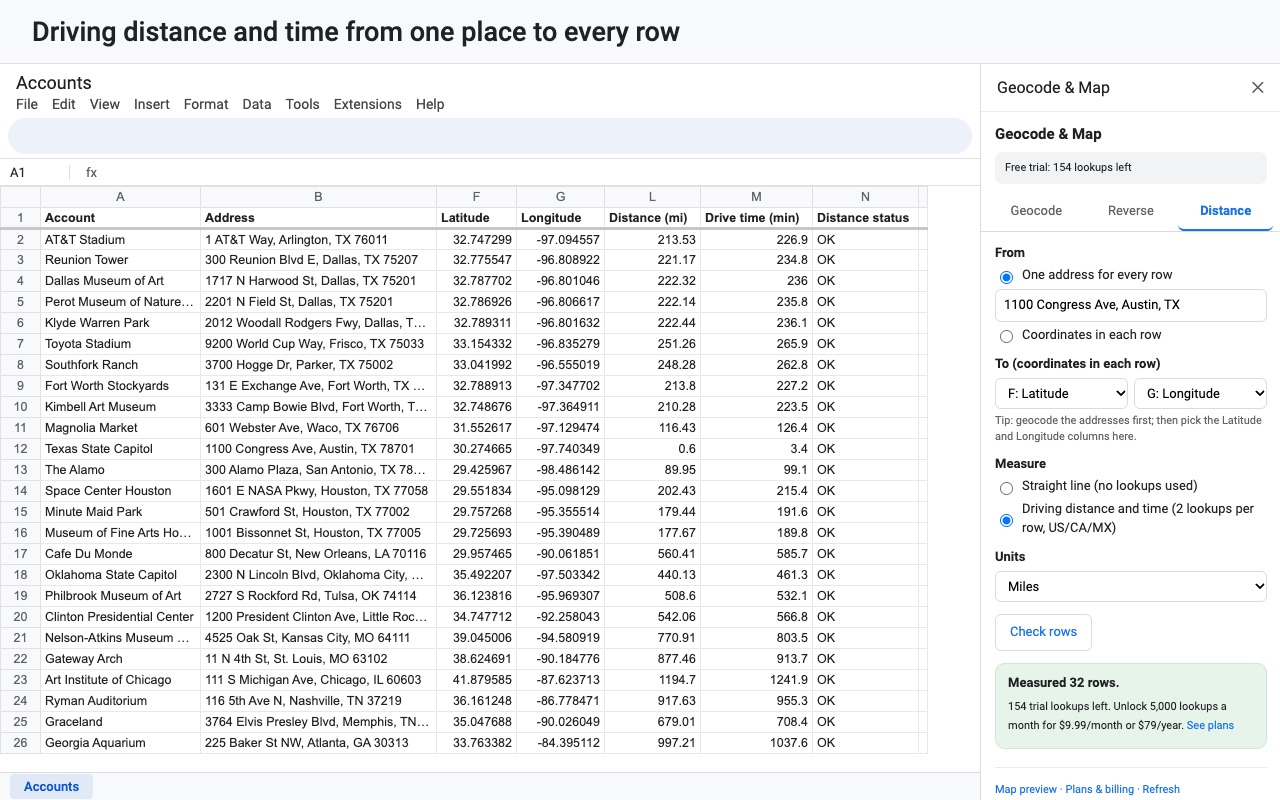
- Driving distance and time between columns (2 lookups per row)
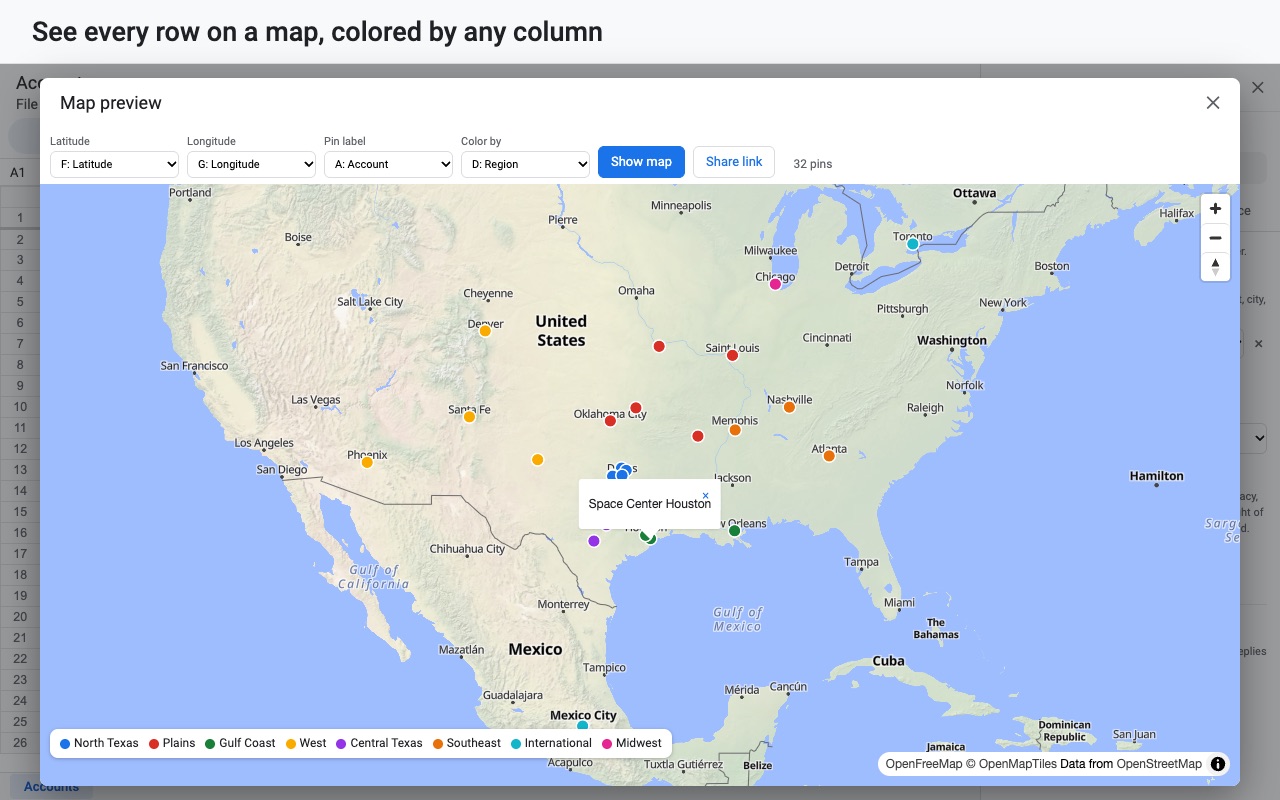
- Map preview with clusters and colors, plus share links
- Straight-line distances at no lookup cost
- Lookup packs: 5,000 for $10, never expire
How Geocode & Map Addresses works
- Install the add-on from the Google Workspace Marketplace and open a spreadsheet with an address column. To see it work first, choose Extensions > Geocode & Map Addresses > Try it on sample data.
- Open Extensions > Geocode & Map Addresses > Open geocoder. The sidebar opens on the Geocode tab, with your lookup balance at the top.
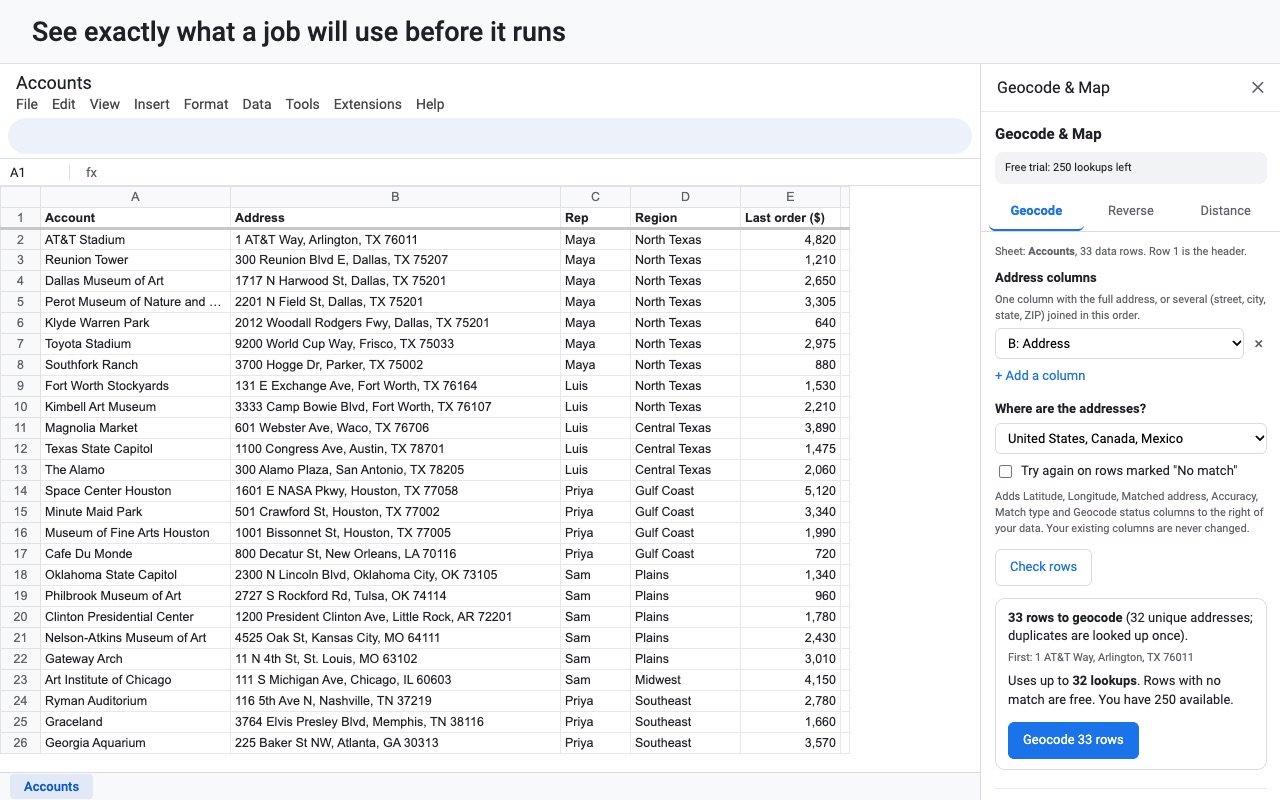
- Pick the address columns. Choose one column with the full address, or click + Add a column to join street, city, state and ZIP in that order. Row 1 is treated as the header.
- Click Check rows. Before anything runs you see how many rows will be geocoded, how many unique addresses that is (duplicates are looked up once), how many finished rows will be skipped, and the most lookups it can use against what you have.
- Click Geocode N rows. The add-on works through the sheet in batches of 250 rows and shows its progress. Stop works at any time.
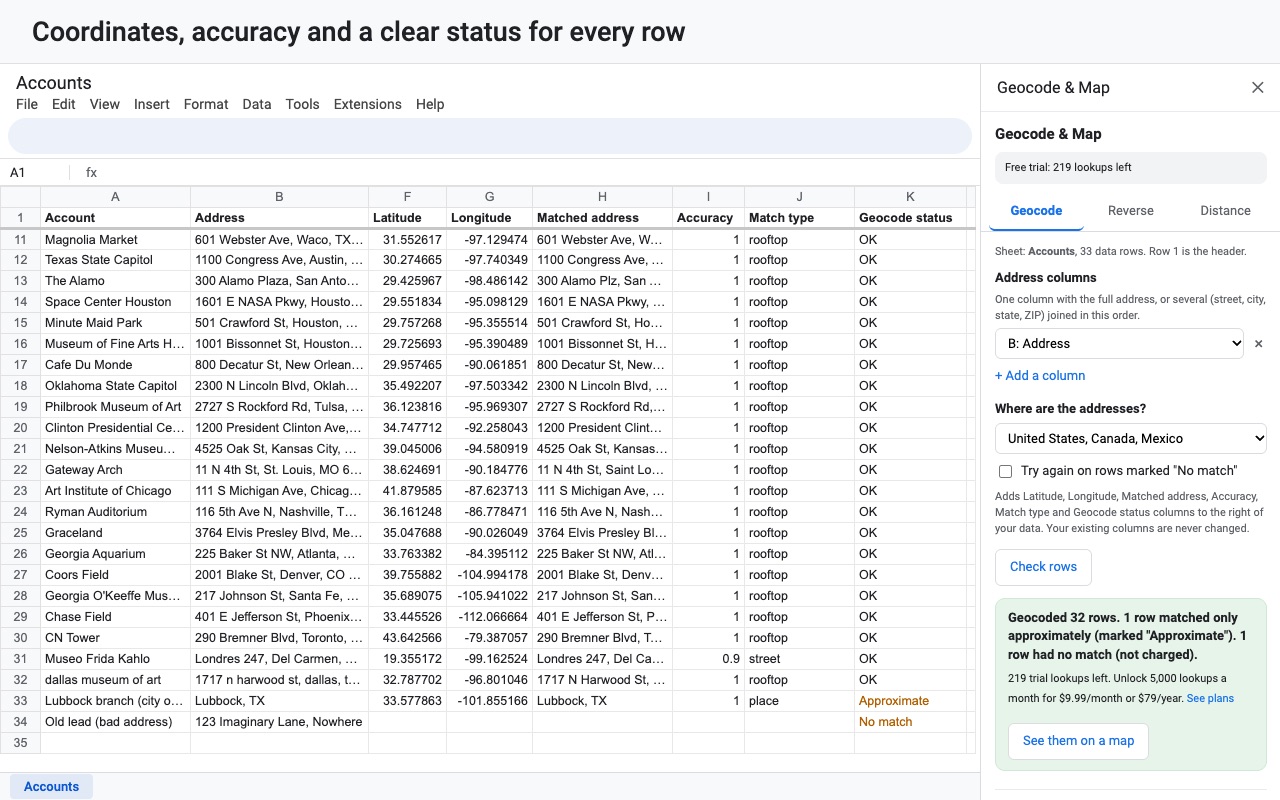
- Read the new columns. Latitude, Longitude, Matched address, Accuracy, Match type and Geocode status are added to the right of your data. Your own columns, formulas and formatting aren't touched.
- Click See them on a map, or use Map preview in the menu, to plot the rows.
Who it's for
Sales and field teams
A list of accounts or leads with street addresses. Geocode it, open the map, color the pins by sales rep or region, and send a share link to someone who doesn't have the sheet.
Delivery and service businesses
Customer addresses that need coordinates before they can be sorted by distance from the shop. Geocode them, then use the Distance tab for straight-line distance from one address, or driving distance and time.
Nonprofits, schools and researchers
Survey responses, donor lists or site records that need latitude and longitude for analysis or for another mapping tool. The coordinates stay in the sheet as plain numbers you can copy anywhere.
Anyone whose old geocoding add-on stopped working
If you were pasting a Google Maps API key, setting up a billing account, or running a script that hits daily quotas, this does the same job without any of that.
What Google Sheets has, and where it stops
Google Sheets has no function that turns an address into coordinates. The routes people usually find are an Apps Script geocoder, which runs into daily quotas on a long list, or the Google Maps Platform, which needs an API key and a billing account, and whose terms limit storing results outside Google Maps. This add-on does the lookups through Great Work's own service, writes the results into the sheet, and keeps them yours to reuse. It's built for lists, not for one address at a time; for a single address, a map search is quicker.
Limits and requirements
- Addresses and coordinates in the United States, Canada and Mexico. Addresses elsewhere can't be geocoded yet.
- Each lookup is one matched address. Rows with no match are free, and rows already marked OK, Approximate or No match are skipped on the next run, so you never pay twice for a row. Tick Try again on rows marked "No match" to retry those.
- A plan includes 5,000 lookups a month. Lookup packs add 5,000 for $10 and never expire.
- The map preview shows up to 10,000 rows, and share links stay open for 90 days.
- Addresses you geocode are sent to the lookup service and its geocoding provider to find coordinates; nothing else in the sheet leaves it.
Geocode & Map Addresses guides
Questions about Geocode & Map Addresses
What does Geocode & Map Addresses do?
Geocode, reverse geocode and map addresses in Google Sheets. No API key needed. Geocode a whole column of addresses in a few clicks, without a Google Maps API key, a billing account or a separate website login.
What does Geocode & Map Addresses work with?
Geocode & Map Addresses works in Google Sheets, in any browser.
How much does Geocode & Map Addresses cost?
$9.99 a month or $79 a year per Google account. The plan includes 5,000 lookups every month. No-match rows are free. Need more, or don't want a subscription? Lookup packs are $10 for 5,000 and never expire. Billed through Stripe. Cancel any time from Plans and billing in the add-on.
Is there a free trial?
Free trial: 250 lookups or 14 days, whichever comes first. No card needed.
Where do I install Geocode & Map Addresses?
From the Google Workspace Marketplace. Use the Install button on this page, or search for "Geocode & Map Addresses by Great Work" there.
Who makes Geocode & Map Addresses?
Great Work LLC, an independent software company. Email hello@greatwork.company with any question about Geocode & Map Addresses and someone will answer.
How do I geocode addresses in Google Sheets?
Install the add-on, open Extensions > Geocode & Map Addresses > Open geocoder, pick the address column (or street, city, state and ZIP), click Check rows, then Geocode N rows. Latitude and longitude are written next to each address.
Do I need a Google Maps API key?
No. There's no key to create, paste or pay Google for. The add-on sends lookups to Great Work's service, which holds the provider key.
What does "Approximate" mean in the status column?
The lookup found the street or the city but not the exact building, so the pin sits on the street or in the town. The Accuracy (0 to 1) and Match type columns say how close it is. Check these rows before you rely on them.
How long does a big list take?
Rows run in batches of 250, each taking a few seconds, so a list of thousands takes minutes rather than hours. You can stop any time and pick up later; finished rows are skipped.
What happens if I run out of lookups partway through?
Check rows tells you before you start. If a job needs more than you have, it runs as many rows as your balance covers and stops. The rest are marked "Not run: no lookups left" and nothing is charged beyond your balance.
Can I fix one row and geocode it again?
Yes. Edit the address, clear that row's Geocode status cell, and run again. Only rows without a finished status are looked up.
Does it work with addresses outside North America?
Not yet. The geocoder covers the United States, Canada and Mexico.
Is the data in my sheet shared with anyone?
The add-on only opens the spreadsheet you use it in. The addresses you choose to geocode go to the lookup service to find coordinates. Nothing else in the sheet leaves it.
More Google Sheets apps
 Huecount
 Fuzzwell
 Includewell
 Fillferry