



Due Date Reminders Email and chat reminders before the dates in your Google Sheet, even with the sheet closed
$4.99 a month or $39 a year per Google account. Free trial: 50 notices or 14 days, whichever comes first. No card needed.
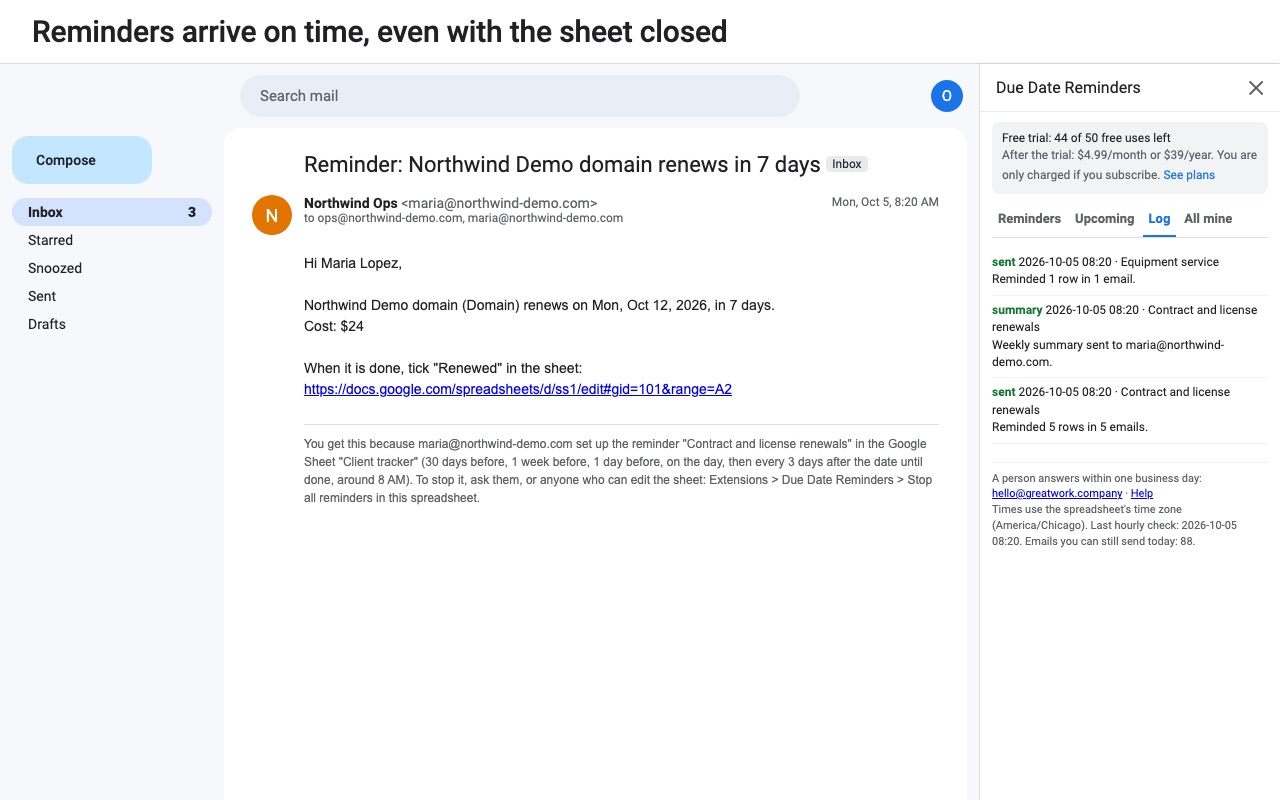
Never miss a renewal, deadline, inspection or expiry that lives in a Google Sheet.
Due Date Reminders watches a date column and notifies the right people a set number of days before each date, on the day, and after it if the row still isn't done. It runs by itself every hour, with the file closed and your computer off.
What you get
- Up to 20 reminders per spreadsheet and 50 recipients per email
- Days before, on and after each date, plus overdue follow-ups until done
- Each row's own recipients, or one combined email per person
- Slack, Discord and Google Chat alerts
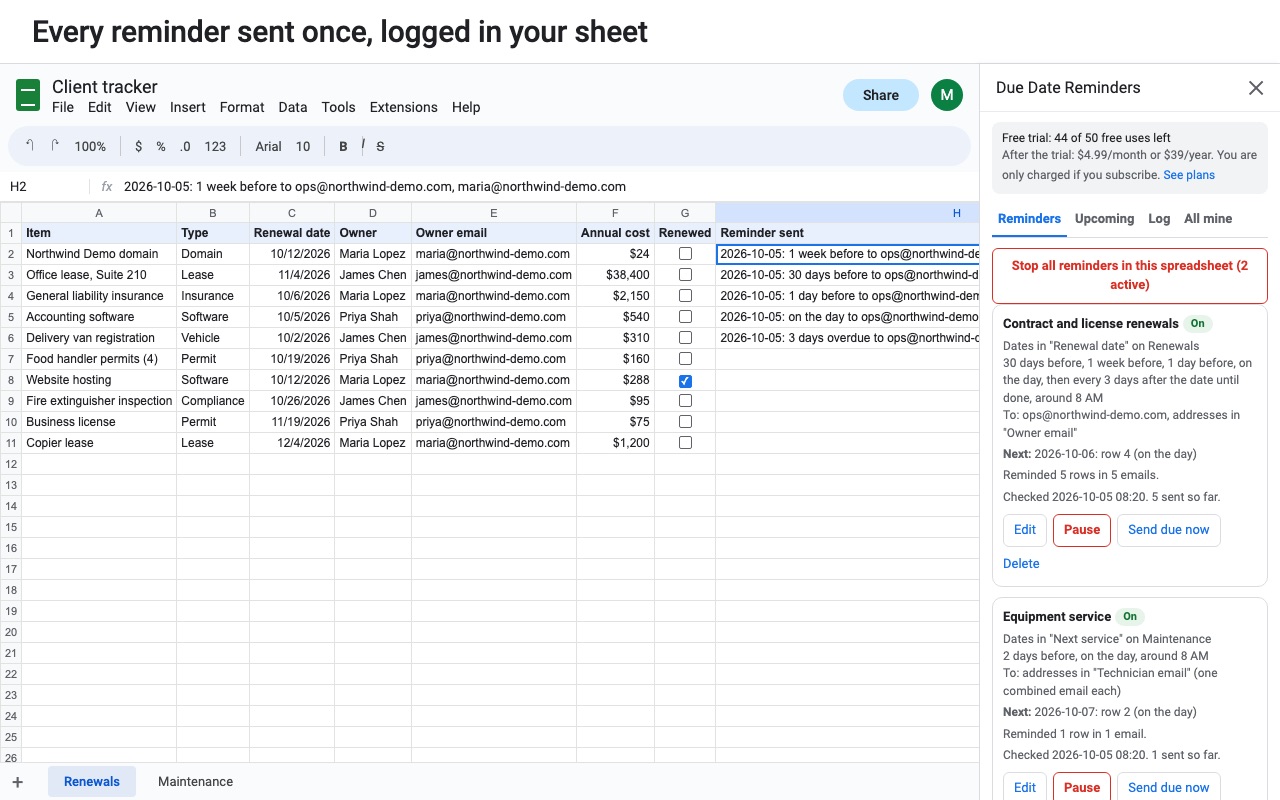
- Never sends twice, catches up missed days, emails you if anything breaks
How Due Date Reminders works
- Install it from the Google Workspace Marketplace, open the spreadsheet with your dates and choose Extensions > Due Date Reminders > Open reminders, then New reminder.
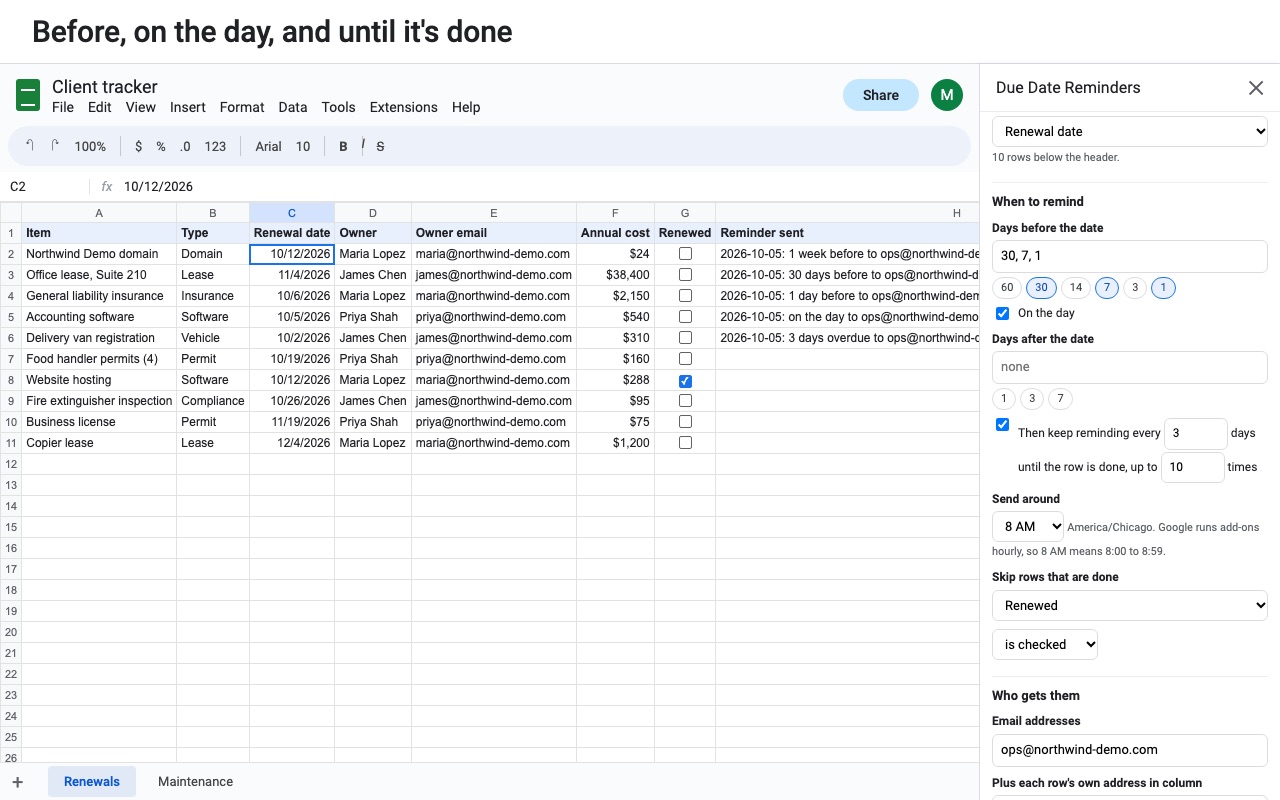
- Under Your dates, pick the Sheet, the Header row and the Date column. Real date cells and dates typed as text both work.
- Under When to remind, choose the days. Tap Days before the date (60, 30, 14, 7, 3 or 1), On the day, Days after the date (1, 3 or 7), and optionally Then keep reminding every N days until the row is done. Pick the hour under Send around.
- Tell it when a row is done with Skip rows that are done: a column that is checked, is not empty, or equals a value such as "Paid".
- Under Who gets them, add Email addresses, and choose Plus each row's own address in column to email the person named on each row. Delivery sends one email per row or one combined email per person per day.
- Write the message. Click a column name to insert it as a placeholder such as
{{Client}}; extras like{{days}}("in 7 days") and{{link}}(opens the sheet at that row) are under More placeholders. Line breaks are kept. - Click Preview next 30 days, then Send test to me, then Turn it on. From then on Google runs it every hour, with the file closed and your computer off.
Who it's for
Renewals and expiries
Software licenses, domain names, insurance policies, vehicle registrations and leases sit in a sheet with an end date. A reminder 30 days and 7 days before gives someone time to act, and an overdue nudge every 3 days keeps going until the Renewed column is checked.
Staff certifications and training
List each person, their email and the date their certificate expires. Each one gets their own reminder, the manager gets a copy, and the Weekly summary to me lists what's overdue and what's coming up.
Invoices and payments due
With Skip rows that are done set to the Status column equals "Paid", follow-ups stop the moment the invoice is marked paid.
Inspections and maintenance
Equipment checks, fire extinguisher dates and filter changes go to the person responsible, and a post to Slack, Discord or Google Chat can put them in front of the whole team.
Due Date Reminders or the tools already in Google
Google Sheets has notification rules under Tools > Notification settings, but they only email you when someone edits the file or a form is submitted. They can't look at a date. Google Calendar can remind you of an event, but that means copying every date to Calendar by hand and keeping both in step. If putting each row on a calendar is what you want, Cellendar syncs rows to Google Calendar events instead.
Due Date Reminders reads the dates where they already are. It keeps a record of what it has sent, so sorting, inserting or deleting rows never sends a reminder twice, and a missed hour or weekend is caught up within 3 days instead of firing several emails at once.
Limits and requirements
- Emails are sent from your own Google account, so Google's daily sending limit for your account type applies. More than 150 emails from one reminder in one run wait for the next hour.
- Up to 20 reminders per spreadsheet, 50 recipients per email and 8 reminder days per reminder, up to 366 days before or after.
- Google runs add-ons once an hour, so "8 AM" means some time between 8:00 and 8:59.
- A reminder belongs to the person who set it up and sends from their account. Other editors can pause or delete it but not edit it.
Due Date Reminders guides
Questions about Due Date Reminders
What does Due Date Reminders do?
Email and chat reminders before the dates in your Google Sheet, even with the sheet closed. Never miss a renewal, deadline, inspection or expiry that lives in a Google Sheet.
What does Due Date Reminders work with?
Due Date Reminders works in Google Sheets, in any browser.
How much does Due Date Reminders cost?
$4.99 a month or $39 a year per Google account. Billed through Stripe. Cancel any time from Plans and billing in the add-on.
Is there a free trial?
Free trial: 50 notices or 14 days, whichever comes first. No card needed.
Where do I install Due Date Reminders?
From the Google Workspace Marketplace. Use the Install button on this page, or search for "Due Date Reminders" there.
Who makes Due Date Reminders?
Great Work LLC, an independent software company. Email hello@greatwork.company with any question about Due Date Reminders and someone will answer.
Can Google Sheets send reminder emails on its own?
No. Sheets can email you about edits, but not about dates in your cells. Due Date Reminders adds that.
Does the spreadsheet need to be open?
No. Reminders run on Google's servers every hour whether the file is open or not.
Will a reminder go out twice if I sort the sheet?
No. Each sent reminder is recorded against the row's content, not its position, so sorting, inserting and deleting rows don't cause repeats. Changing a row's date does schedule new reminders for the new date.
What happens if something breaks, like a renamed column?
The reminder shows a problem in the sidebar and emails you about it, at most once a day. It keeps checking every hour, and anything due in the last 3 days goes out once it's fixed.
Can I mark in the sheet that a reminder was sent?
Yes. Turn on Note each sent reminder in a "Reminder sent" column of the sheet.
Can I send from a different name or reply-to address?
You can set the Sender name and a Reply-to address. Emails still come from your Google account.
How do I stop every reminder at once?
Choose Extensions > Due Date Reminders > Stop all reminders in this spreadsheet, or Pause or resume my reminders everywhere for every file.
What counts toward the free trial?
Each row reminded, or each combined email, is one notice. Tests, previews and weekly summaries are free.
More Google Sheets apps
 Fillferry
 Cellwell
 Fuzzwell
 Cellfetch