


Sightwell Find and fix SEO, accessibility and launch problems across your Framer site: alt text, headings, contrast, link text, titles and descriptions, CMS fields and staging links
$19 a month or $169 a year per seat, or $199 once. Free trial: 15 fixes or reports over 7 days, each fix changing up to 25 things. Scanning is always free. No card needed.
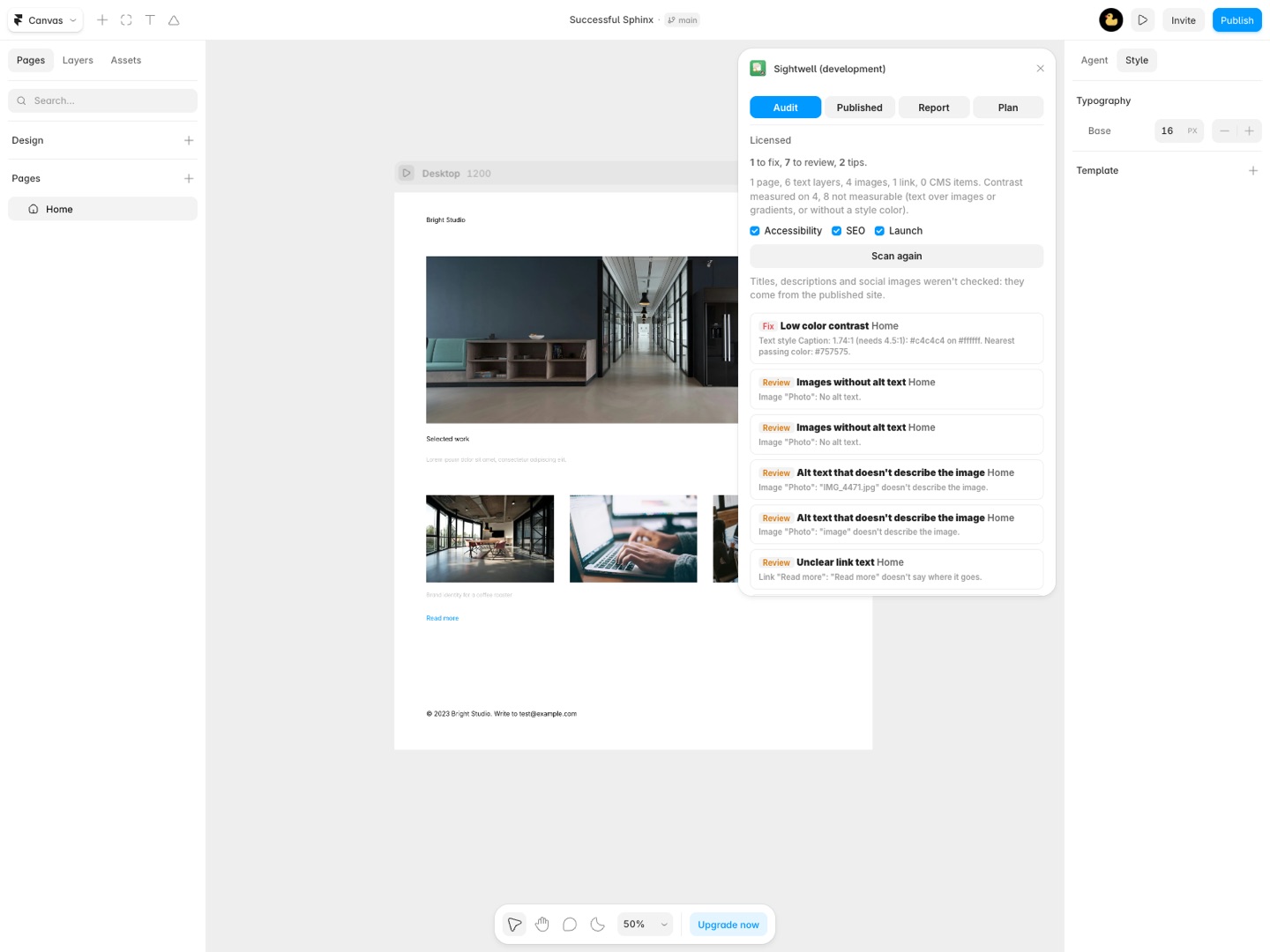
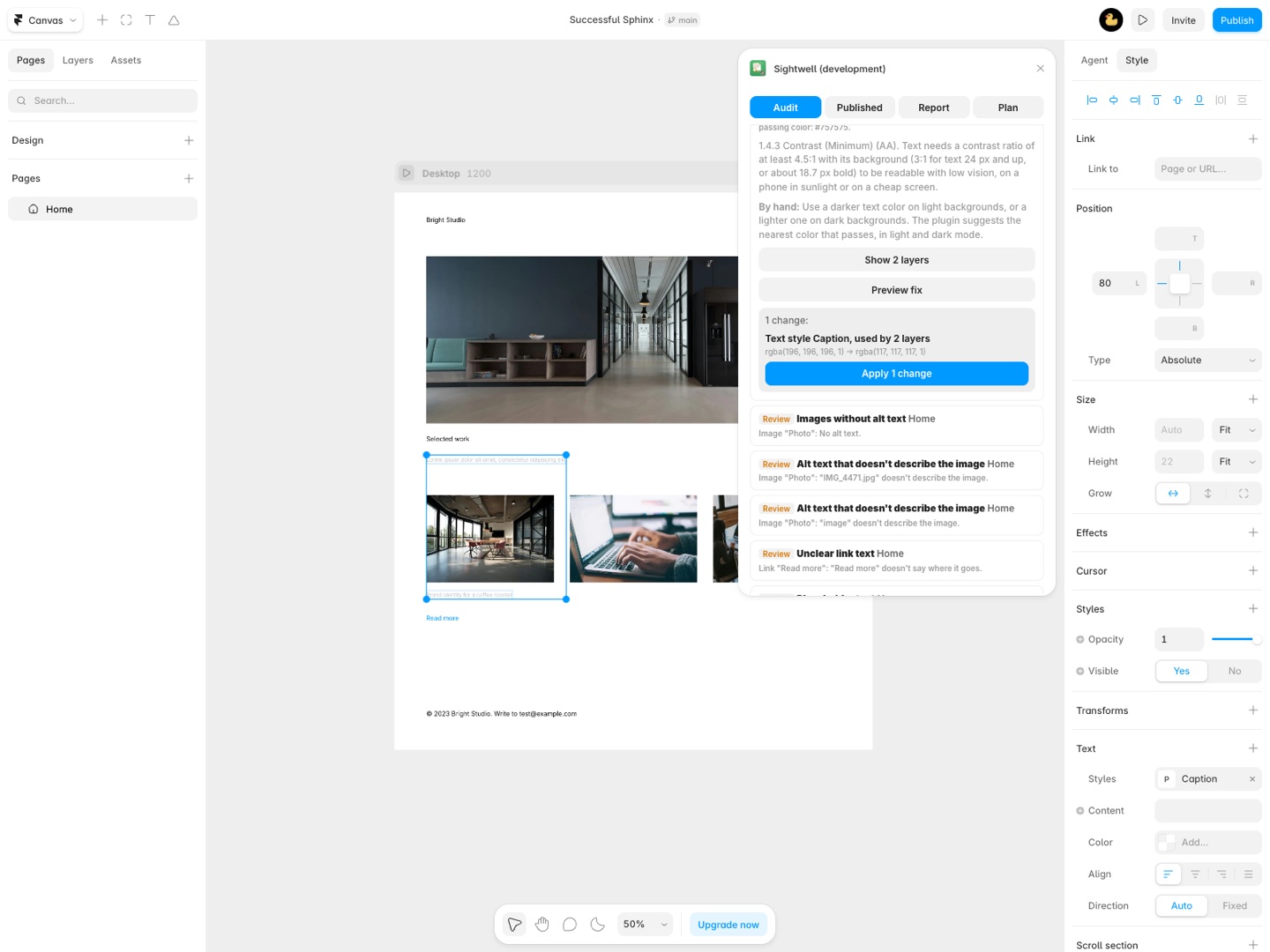
Find what's wrong before your visitors and Google do, and fix most of it without leaving Framer. Sightwell checks every page, component and CMS collection for SEO, accessibility and launch problems, tells you why each one matters, and fixes what it can in place. You see the before and after first, and you can undo.
What you get
- Scans every page, component and CMS collection in one go, and lists each problem with where it is, why it matters and how to fix it
- Alt text: images, images passed into components and CMS image fields without alt text, or with a file name or a single word as alt text
- Alt text fixed in place, by hand or for every CMS item at once from a template of the item's own fields, with a preview
- Heading order: skipped levels, empty headings and pages without exactly one H1, fixed with a copy of the text style that only changes the tag
- Color contrast for every text style against the background behind it, in light and dark mode, with the nearest passing color applied to the style
- Links with no text, vague link text (read more, click here, raw addresses) and links still pointing at your framer.website address, with the address fixed for you
- Search titles and meta descriptions read from your published pages: missing, cut off in Google, or repeated across pages, plus social images, noindex and the page language
- CMS SEO fields: empty, too long or repeated values, filled from a template with a preview
- Launch checks: lorem ipsum, TODO notes, test emails and 555 numbers, old copyright years, empty CMS fields
- Every fix shows the before and after values first, skips anything edited since the scan, and can be undone
- PDF and CSV reports for a client, with WCAG 2.2 references and what an automatic check can't tell you
- Nothing about your project is uploaded; published pages are read through Great Work's page reader, which stores nothing
How Sightwell works
- Open Sightwell in your Framer project and click Scan project. It reads every web page at the Desktop breakpoint, every component, your text styles and every CMS collection. Scanning changes nothing.
- Read the Audit tab. Findings are grouped into Accessibility, SEO and Launch, each marked Fix, Review or Tip, with where it is, why it matters and how to fix it by hand.
- Publish, then open the Published tab and click Read published pages. Framer doesn't let plugins read page titles, descriptions, social images or indexing settings, so Sightwell reads them from the live site. Those findings join the Audit tab under SEO.
- Open a finding and click Preview fix where there is one. Type the alt text, the link text or a template if it asks, and check every before and after value.
- Apply. Anything edited since the scan is skipped. Undo last fix puts the previous values back.
- Download the report. The Report tab gives you a PDF for a client and a CSV of every finding.
The Sightwell documentation explains templates, filters and how each fix changes your styles.
Who it's for
Agencies handing a site to a client
Run a scan the day before launch and send the PDF with the handoff: what was found, what you fixed, the WCAG 2.2 criterion behind each item and what still needs a person, like keyboard use and captions.
Sites with a large CMS
A blog with 300 posts where half the cover images have no alt text. Sightwell finds them as one finding and fills them from a template of each item's own fields, such as {Title}, cover photo, after showing you every value it will write.
Moving to your own domain
After a site moves from its framer.website address to a custom domain, full links that still name the old address are easy to miss: they don't look broken in the editor. Sightwell lists every layer link and CMS value that still points there and rewrites them.
Designers who reuse text styles
Contrast is checked per text style, against what's behind each layer, in light and dark mode. The fix changes the color style itself, so every layer that uses it changes at once, and the preview tells you how many.
Sightwell or a page-by-page audit tool
Browser audit tools such as Lighthouse in Chrome check one published URL at a time and report problems in the HTML. They can't tell you which Framer layer, text style or CMS field caused a problem, and they can't change anything in the project. Sightwell starts from the project: it names the layer or CMS item, and for alt text, headings, contrast, link text, staging links and CMS SEO fields it makes the change in Framer.
Its limits are plain. Text over an image or gradient has no single background color, so its contrast is listed as not measured instead of guessed. Text color set on part of a text layer, code components and embeds aren't visible to plugins. And no scan makes a site accessible on its own: whether alt text is accurate, keyboard use and captions need a person, which the report says.
Requirements
- A Framer project, in the desktop app or the browser. Fixes need edit access to the project. Without it, Sightwell says so and changes nothing.
- A published site for the title, description, social image and indexing checks. Sightwell reads every static page and up to 10 items of each CMS page, 150 pages at most.
- Alt text and template fills come from what you type or from your own CMS fields. Sightwell doesn't write text for you.
Sightwell guides
Questions about Sightwell
What does Sightwell do?
Find and fix SEO, accessibility and launch problems across your Framer site: alt text, headings, contrast, link text, titles and descriptions, CMS fields and staging links. Find what's wrong before your visitors and Google do, and fix most of it without leaving Framer. Sightwell checks every page, component and CMS collection for SEO, accessibility and launch problems, tells you why each one matters, and fixes what it can in place. You see the before and after first, and you can undo.
What does Sightwell work with?
Sightwell works in Framer, in the desktop app and in the browser.
How much does Sightwell cost?
$19 a month or $169 a year per seat. $199 once for lifetime access, per seat. Buying for a team? Pick the number of seats at checkout and one license key covers everyone. Billed by Great Work LLC through Stripe, not through Framer. Cancel any time from Manage billing.
Is there a free trial?
Free trial: 15 fixes or reports over 7 days, each fix changing up to 25 things. Scanning is always free. No card needed.
Where do I install Sightwell?
From the Framer Marketplace. Use the Install button on this page, or search for "Sightwell" there.
Who makes Sightwell?
Great Work LLC, an independent software company. Email hello@greatwork.company with any question about Sightwell and someone will answer.
Does Sightwell check meta descriptions in Framer?
Yes, from your published pages: missing, likely to be cut off in Google, or the same on several pages. Sightwell measures them in pixels against a common desktop estimate, because Google cuts by width, not characters. Framer doesn't let plugins edit page settings, so it tells you which page to change.
Can it add alt text to CMS images?
Yes. CMS image fields without alt text, or with a file name or a single word, are filled from a template like {Title} with a preview. Images on the canvas get alt text you type once.
How does it fix heading levels without changing my design?
It makes a copy of the layer's text style with only the tag changed, named like "Heading 4 (H3)", and reuses it next time. The text looks the same; the tag is right.
Which WCAG version does it follow?
WCAG 2.2. Each accessibility finding names its success criterion, such as 1.4.3 Contrast (Minimum).
Does it check pages that aren't published yet?
The canvas checks (alt text, headings, contrast, links, launch checks, CMS fields) work on an unpublished project. Titles, descriptions, social images and indexing need the published site.
Is my project uploaded anywhere?
No. The scan runs in the plugin. Only the addresses of your published pages go to Great Work's page reader, which fetches each page's head and stores nothing.
What does a fix count as on the trial?
Each fix or report download is one of the trial's 15 uses over 7 days, and a trial fix changes up to 25 things. Scanning is always free.
Does one seat cover all my client projects?
Yes. A seat covers every project you open, on up to two Framer accounts.
More Framer apps
 Sourceferry
 Shelfferry
 Stepkiln
 Pressferry