



Collatewell Merge, split, reorder, number, watermark and compress PDFs in Google Drive, privately in your browser
$24.99 a month or $180 a year per Google account. Free trial: 10 saves or 14 days, whichever comes first. No card needed.
Collatewell does the everyday PDF jobs Google Drive can't: merge, split, reorder, rotate, delete and extract pages, add page numbers, Bates numbers and watermarks, and compress big scans. Select PDFs in Drive, right-click, Open with Collatewell, and save the result next to your files.
What you get
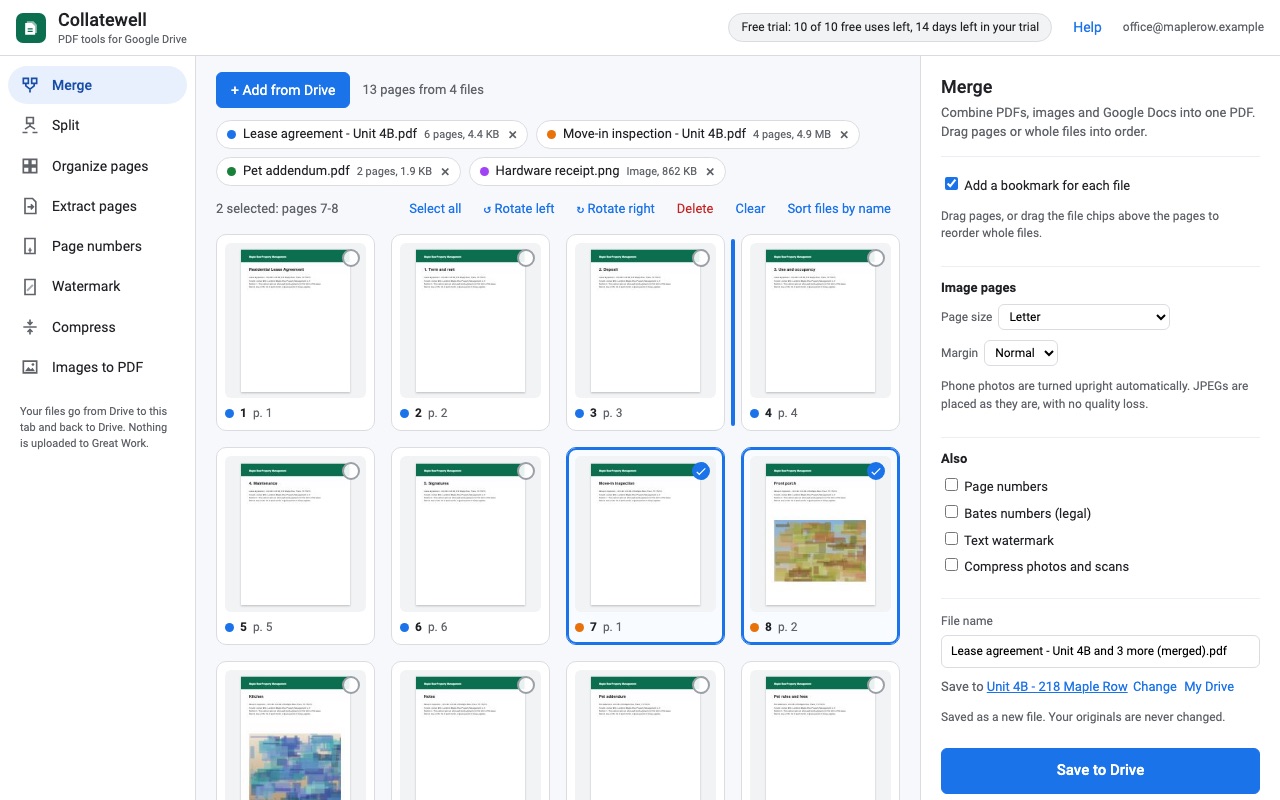
- Merge PDFs, JPEG/PNG images and Google Docs, Sheets and Slides into one PDF, with drag-to-reorder page thumbnails and a bookmark per file
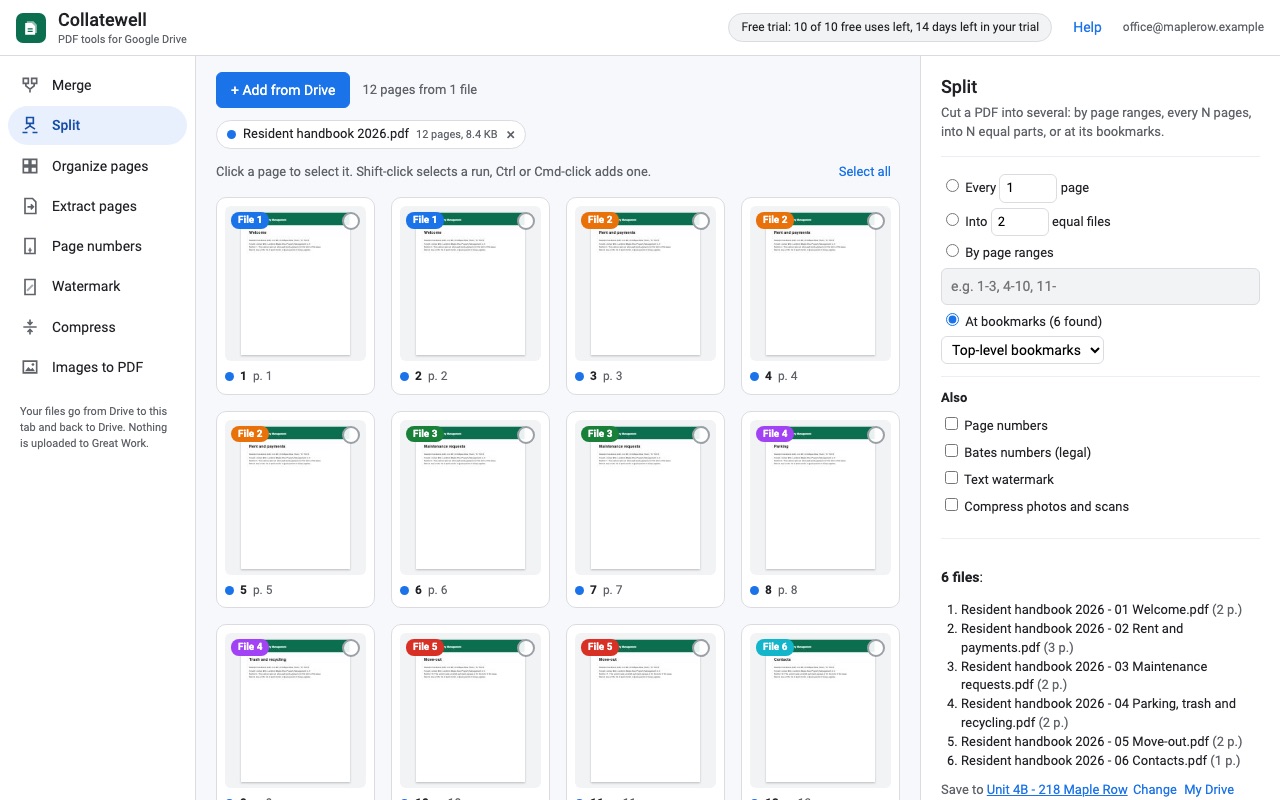
- Split by page ranges, every N pages, into N equal files, or at the PDF's bookmarks
- Reorder, rotate, delete and extract pages
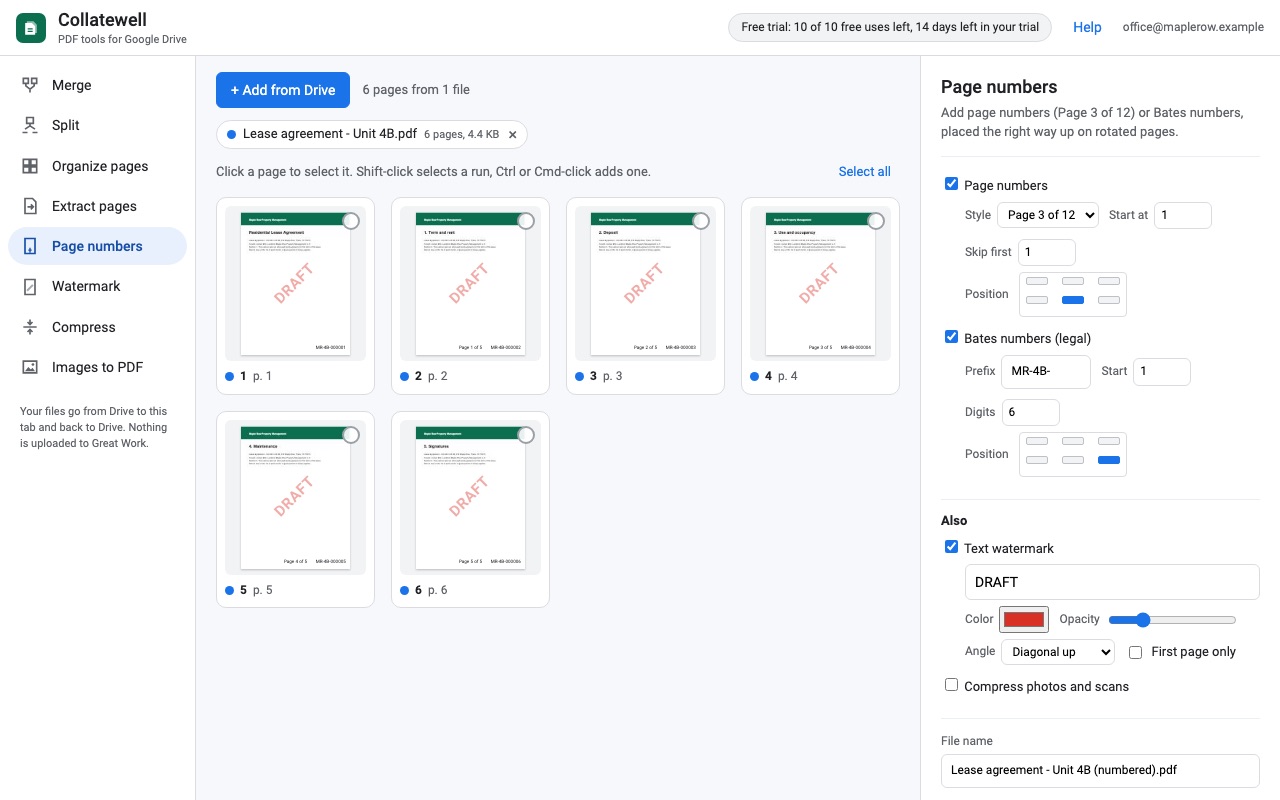
- Page numbers (Page 3 of 12, skip the cover) and Bates numbers, upright on rotated pages
- Text watermarks such as DRAFT or CONFIDENTIAL
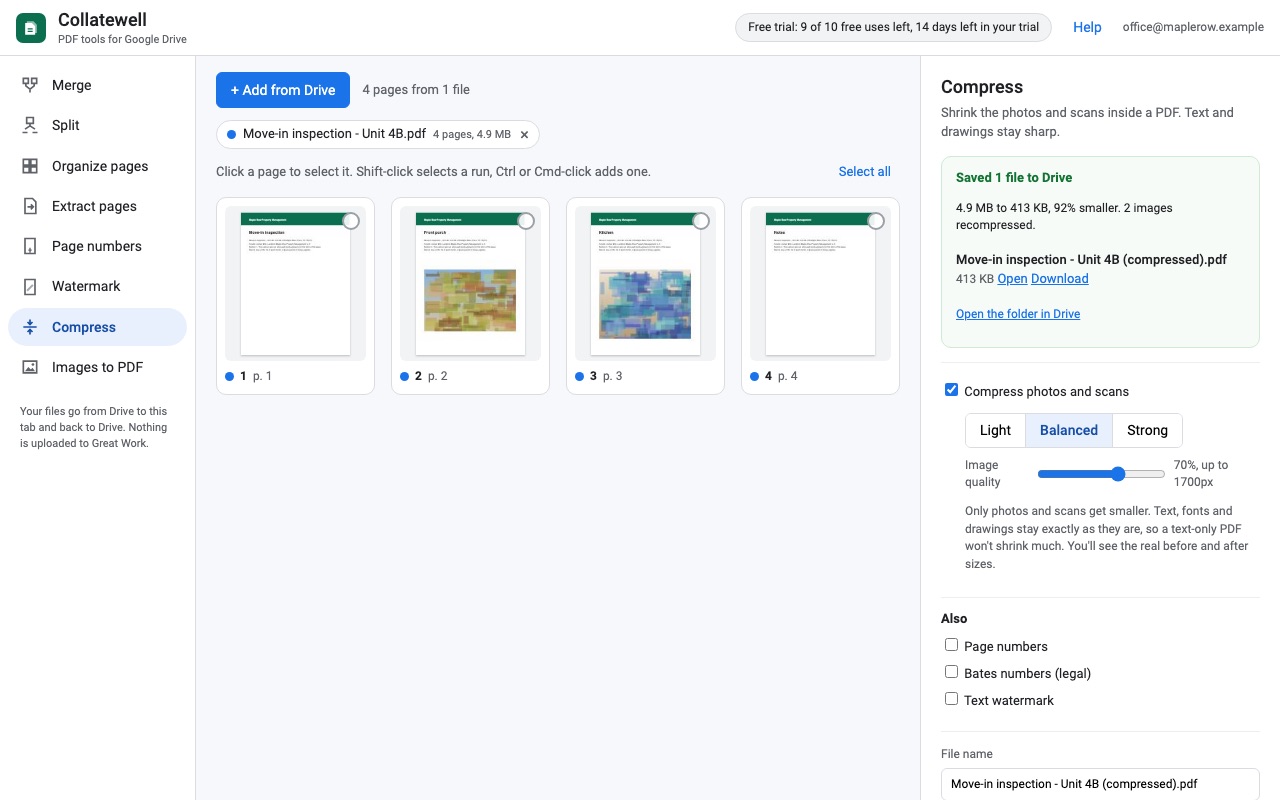
- Compress photos and scans with a quality slider, with the real before and after size
- Images to PDF: phone photos turned upright, Letter, A4 or fit-to-image pages
- Works from Drive: right-click > Open with, or pick files; results saved next to the originals as new files
- Files go Drive > your browser > Drive: never uploaded to Great Work or anyone else. No ads, no page caps
How Collatewell works
- Install Collatewell from the Google Workspace Marketplace. It adds itself to Google Drive's Open with menu.
- In Drive, select one or more PDFs, right-click and choose Open with > Collatewell. It opens in a browser tab with a thumbnail of every page. To start in a folder, use New > More > Collatewell there, and the folder becomes where results are saved.
- Pick a tool: Merge, Split, Organize pages, Extract pages, Page numbers, Watermark, Compress or Images to PDF. You can add more files from Drive with the picker, including JPEG and PNG images and Google Docs, Sheets and Slides, which are added as PDF.
- Arrange the pages. Drag single pages, or drag the file chips above them to move whole files. Rotate or delete pages as you go.
- Add extras from Also, such as page numbers or a watermark on a merge, so one save does both.
- Name the file, check Save to, and click Save to Drive. The result is a new file next to your originals. You can choose Replace the original file instead; Drive keeps the old version in its version history.
Who it's for
Offices that assemble packets
Combine a cover letter written in Docs, a signed PDF and a scanned receipt into one file, in the order you drag them, with a bookmark for each file if you want one.
Legal and compliance work
Bates numbers (legal) stamps every page with your prefix and a running number (6 digits by default), and Page numbers adds "Page 3 of 12", skipping the cover if you like. Stamps are placed upright even on rotated pages.
Anyone sending scans that are too big to email
Compress recompresses the photos and scans inside a PDF with an image quality slider and shows the real size before and after. Text and drawings stay sharp.
Teachers and students handing in work
Images to PDF turns phone photos of pages into one PDF on Letter, A4 or photo-sized pages, with each photo turned the right way up.
Collatewell or what Google Drive does on its own
Google Drive can preview a PDF and print it, and Docs, Sheets and Slides can download as PDF, but Drive has no way to merge, split, reorder or number PDF pages. The usual answer is a PDF website: download from Drive, upload to the site, download the result and upload it back to Drive. Collatewell skips that round trip. The PDF work happens in your own browser tab, and files go from Drive to your browser and back to Drive, never to Great Work or another server.
If the PDFs you need start out as Gmail messages, Sheafwell saves Gmail conversations as PDFs in bulk.
Limits
- Password-protected PDFs can't be opened for editing; Collatewell explains this instead of failing.
- Compress shrinks photos and scans, not text, so a text-only PDF barely changes. An image is only replaced when the new one is at least 10% smaller.
- Watermark and number text uses the standard PDF fonts, so it supports Western European letters only.
- Bookmarks, form fields and links inside the original PDFs don't carry over into merged or split files.
- Google exports Docs, Sheets and Slides as PDF up to 10 MB each.
- Keep the browser tab open while it works.
Collatewell guides
Questions about Collatewell
What does Collatewell do?
Merge, split, reorder, number, watermark and compress PDFs in Google Drive, privately in your browser. Collatewell does the everyday PDF jobs Google Drive can't: merge, split, reorder, rotate, delete and extract pages, add page numbers, Bates numbers and watermarks, and compress big scans. Select PDFs in Drive, right-click, Open with Collatewell, and save the result next to your files.
What does Collatewell work with?
Collatewell works in Google Drive, in any browser.
How much does Collatewell cost?
$24.99 a month or $180 a year per Google account. Team plan: $2499 a year covers everyone at your company or school who signs in to Google with an email address on your domain (not Gmail or other personal addresses). Billed through Stripe. Cancel any time: open Collatewell from Google Drive, click your plan in the Collatewell window, then Manage billing.
Is there a free trial?
Free trial: 10 saves or 14 days, whichever comes first. No card needed.
Where do I install Collatewell?
From the Google Workspace Marketplace. Use the Install button on this page, or search for "Collatewell" there.
Who makes Collatewell?
Great Work LLC, an independent software company. Email hello@greatwork.company with any question about Collatewell and someone will answer.
How do I combine PDFs in Google Drive?
Select the PDFs in Drive, right-click, choose Open with > Collatewell, drag the pages into order on the Merge tool and click Save to Drive. See the steps for splitting a PDF too.
Are my files uploaded anywhere?
No. Collatewell can only open the files you choose. They are processed in your browser tab and saved back to your Drive.
Is there a page limit?
No. Collatewell has no page caps and no file count limit per merge.
Can I merge Google Docs with PDFs?
Yes. Add a Doc, Sheet or Slides file and it is added as PDF pages, which you can arrange with the rest.
What counts as a save in the trial?
One click of Save to Drive, however many files it writes, so a split into 20 files is one save. Adding files, arranging pages and failed saves don't count.
Does it edit the text inside a PDF?
No. Collatewell organizes, stamps and compresses pages. It doesn't edit text, fill forms or collect signatures.
Can I undo a save?
Results are new files, so your originals are untouched. If you chose to replace the original, open its version history in Drive to get the old version back.
More Gmail and Google Drive apps
 Email Clipper for Notion
 Unpackwell
 Aloudwell
 Cellendar