



Tokenmend Turn design tokens into Framer color and text styles, keep them in sync, audit and clean up styles, and export them to CSS, Tailwind and JSON
Also for Figma
$12 a month or $89 a year per seat, or $119 once. Free trial: 10 runs over 7 days, each changing up to 40 styles. Reading files, the preview, the audit and the CSV are always free. No card needed.
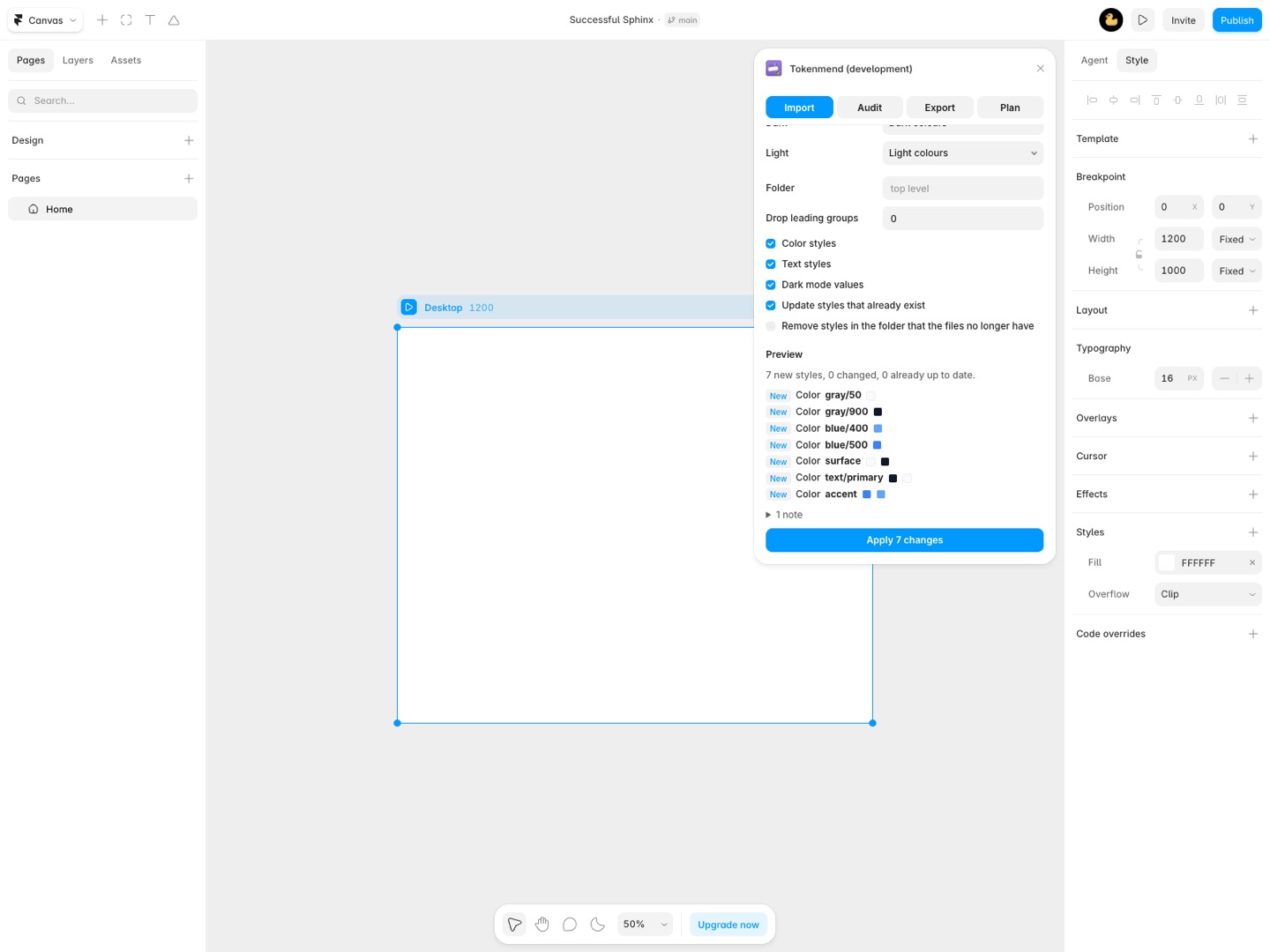
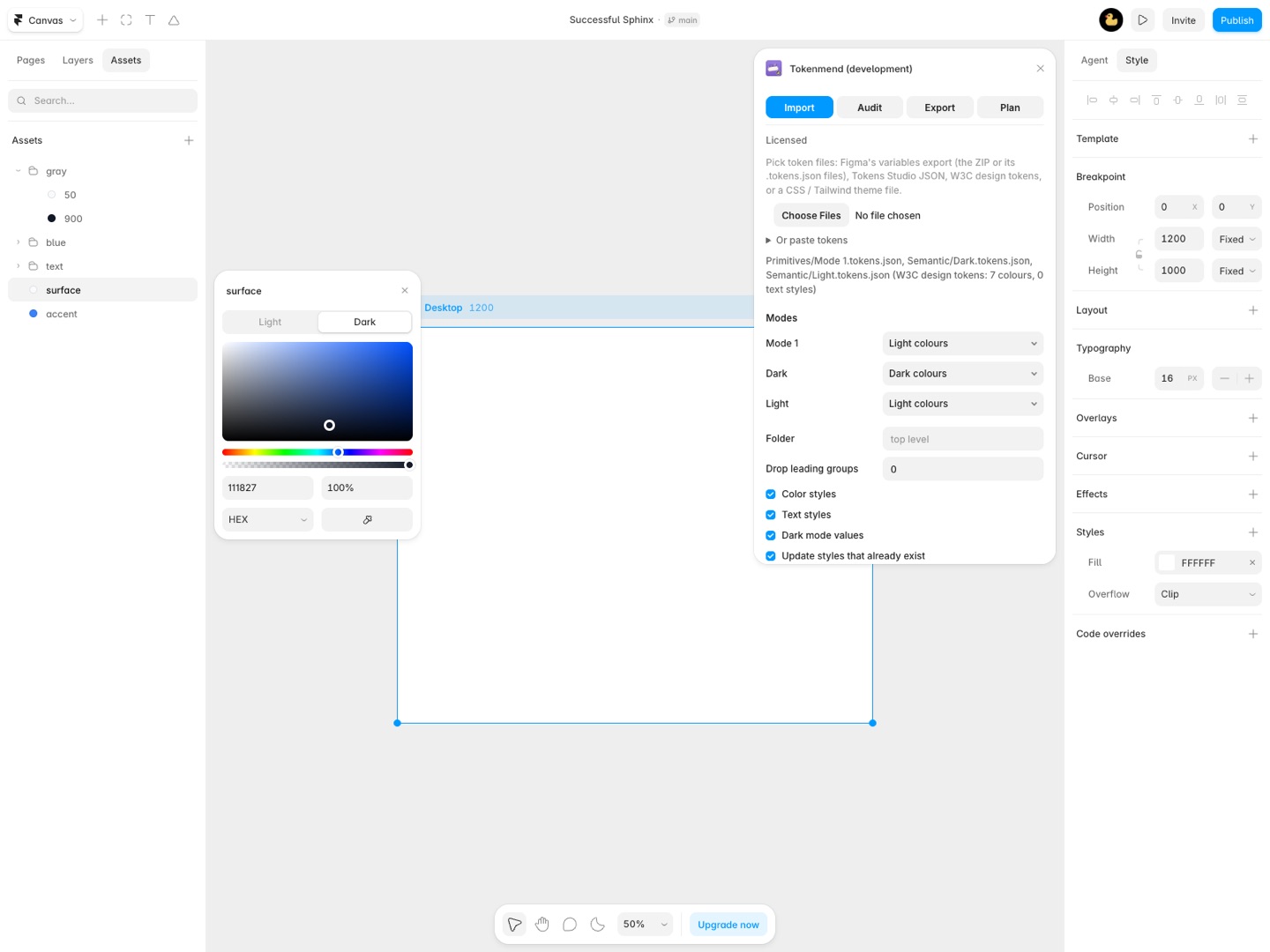
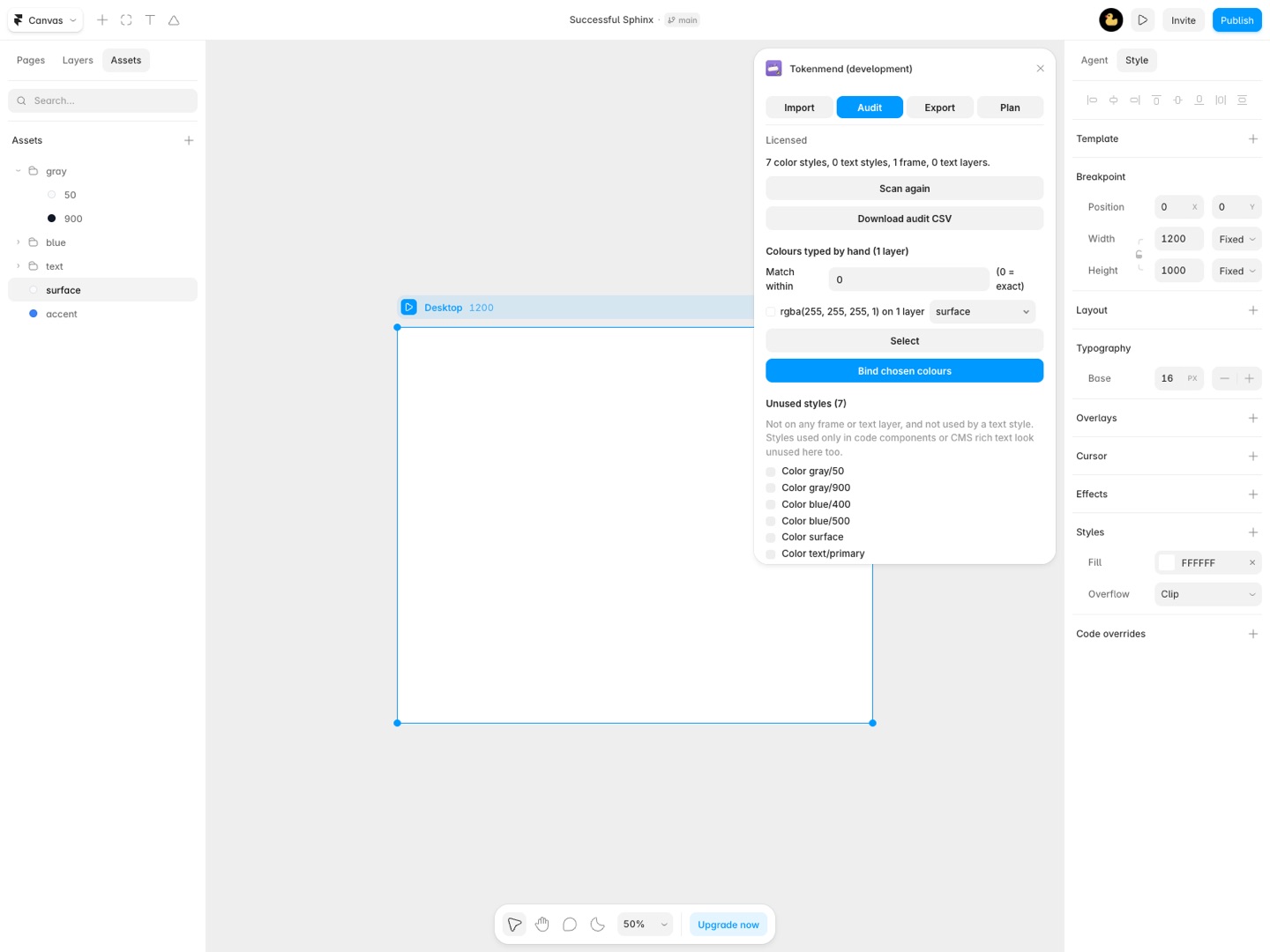
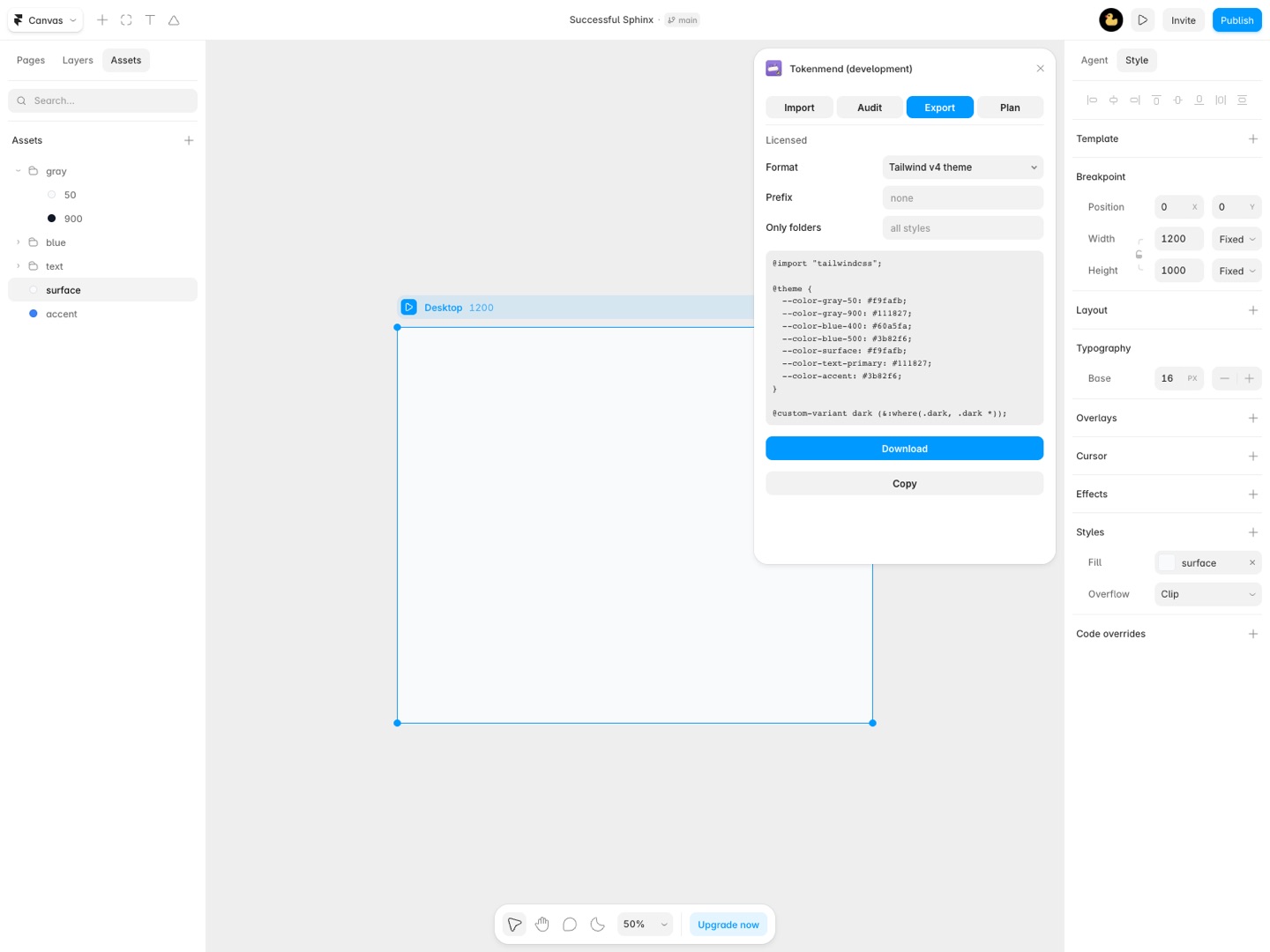
Your design system, in Framer styles. Tokenmend reads the design tokens you already have and turns them into Framer color and text styles: light and dark values, fonts, sizes and responsive breakpoints. Change the tokens, run it again, and your styles update in place.
What you get
- Imports the design tokens Figma itself exports (one file per mode or the ZIP), Tokens Studio JSON, W3C design tokens, CSS variables and Tailwind v4 theme files
- Light and dark values become one Framer color style with a dark mode, aliases resolved per mode
- Type tokens become text styles with the right font, weight, size, line height, letter spacing, case and HTML tag, linked to the color style they use
- Desktop, tablet and mobile type sizes from Figma modes become text style breakpoints
- A preview of every style it creates or changes, with the before and after values, before anything is touched
- Run it again after the tokens change: styles update in place, and optional sync removes the ones the files dropped from your token folder
- An audit of every color and text style: where each is used, unused ones, duplicates, colours typed by hand on layers and text without a style
- Hand-typed colours bound to the matching color style on backgrounds and borders, in bulk
- Fonts replaced across text styles and loose text layers, with the nearest weight picked for you
- Duplicate styles merged into one and unused styles deleted, checked against the project again first
- Export your styles as W3C design tokens, CSS custom properties with a dark scheme, or a Tailwind v4 theme
- Nothing about your project is uploaded
How Tokenmend works
- Open Tokenmend from Framer's Quick Actions (Cmd+K or Ctrl+K). It has four tabs: Import, Audit, Export and Plan.
- Pick your token files on Import: the ZIP from Figma's variables export or its
.tokens.jsonfiles, a Tokens Studio JSON export, W3C design tokens, or a CSS or Tailwind v4 theme file. You can also paste tokens and click Read pasted tokens. - Check the Modes list. Each mode is set to Light colours, Dark colours, Desktop type (1200+), Tablet type (810+), Phone type or ignored. Tokenmend guesses from the mode names; change any it got wrong.
- Set a Folder for the styles (for example
Tokens) and, if every token name starts with a collection name you don't want in Framer, raise Drop leading groups. - Read the Preview. It counts new styles, changed ones and ones already up to date, and lists each with its old and new values.
- Click Apply N changes. If existing styles change, a second click confirms.
- Run it again when the tokens change. Matching styles update in place; new tokens become new styles.
Every option is described in the Tokenmend documentation.
Who it's for
Teams whose design system lives in Figma
The variables are already in Figma with Light and Dark modes. Export the collection, drop the ZIP into Tokenmend, and each color variable becomes one Framer color style with its light and dark value, aliases followed per mode.
Agencies building many client sites
A client sends a brand tokens file. Instead of typing 40 colors and 12 text styles into a new project, you import them into a folder, and the next project starts from the same file.
Projects that grew messy
Years of edits left three near-identical blues, styles nothing uses and colors typed straight onto frames. Audit finds them, binds hand-typed colors to the matching style, merges duplicates and deletes unused styles after checking the project again.
Handing styles to developers
Export writes the project's styles as W3C design tokens, CSS custom properties with a dark scheme, or a Tailwind v4 theme, so the code uses the same names as the design.
Tokenmend or typing styles in by hand
Framer's Assets panel is where you make color and text styles, one at a time: a name, a light value, a dark value, then the font, size and breakpoints for each text style. For a handful of styles that's quick. For a token set with dozens of colors and a type scale across three breakpoints, it means retyping values that already exist in a file, and doing it again every time the file changes. Tokenmend reads the file, shows you every change, and updates the same styles on the next run instead of creating copies.
What Tokenmend leaves out: Framer styles hold colors and type, so spacing, radius and shadow tokens are listed as left out. Framer doesn't let plugins set fonts you uploaded yourself, so text styles that need one are listed and skipped. A text style holds at most 4 sizes, which is Framer's limit.
Requirements
- A Framer project, and edit access to it.
- Token files in one of the formats above. Nothing is uploaded: files are read inside the plugin, and the license check is the only network call.
- Fonts from Framer's own font list. Custom uploaded fonts can be set by hand after the import.
Tokenmend guides
Questions about Tokenmend
What does Tokenmend do?
Turn design tokens into Framer color and text styles, keep them in sync, audit and clean up styles, and export them to CSS, Tailwind and JSON. Your design system, in Framer styles. Tokenmend reads the design tokens you already have and turns them into Framer color and text styles: light and dark values, fonts, sizes and responsive breakpoints. Change the tokens, run it again, and your styles update in place.
What does Tokenmend work with?
Tokenmend works in Framer, in the desktop app and in the browser.
How much does Tokenmend cost?
$12 a month or $89 a year per seat. $119 once for lifetime access, per seat. Buying for a team? Pick the number of seats at checkout and one license key covers everyone. Billed by Great Work LLC through Stripe, not through Framer. Cancel any time from Manage billing.
Is there a free trial?
Free trial: 10 runs over 7 days, each changing up to 40 styles. Reading files, the preview, the audit and the CSV are always free. No card needed.
Where do I install Tokenmend?
From the Framer Marketplace. Use the Install button on this page, or search for "Tokenmend" there.
Who makes Tokenmend?
Great Work LLC, an independent software company. Email hello@greatwork.company with any question about Tokenmend and someone will answer.
Can I import Figma variables into Framer?
Yes. In Figma, right-click a variable collection and choose Export modes, then drop what it saves (the ZIP or the .tokens.json files) into Tokenmend. You don't sign in to Figma.
Does it handle light and dark mode?
Yes. Map one mode to Light colours and one to Dark colours, and each color becomes a single Framer color style with both values.
What happens to styles I already made?
Tokenmend matches styles by their full name, folder included. With Update styles that already exist on, a style whose name matches a token gets the token's value, and the preview shows the before and after first. Turn it off to only add new styles.
Will running it again create duplicates?
No. A second run updates the styles it made before. With Remove styles in the folder that the files no longer have on, styles whose tokens were deleted go too, after a confirm.
Does it work with Tokens Studio?
Yes, with its JSON export. Tokenmend isn't made or endorsed by Tokens Studio.
Why does a style show as unused when I use it?
Styles used only inside code components or CMS rich text aren't visible to the scan. Delete unused re-checks the project first, but not code.
What does a run mean on the trial?
One applied change set or one export. The trial is 10 runs over 7 days, each changing up to 40 styles. Reading files, the preview, the audit and its CSV are free.
Does one seat cover several projects?
Yes. A seat is activated on a Framer account, up to two accounts per seat, not on a project, so it works in every project you open.
More Framer apps
 Pressferry
 Stepkiln
 Shelfferry
 Sourceferry